1. Introduction
Nearly 30 years ago, I got it in my head that I wanted to build a community platform. It took me nearly a decade of late nights spent learning how to program before I finally managed to build it. The platform saw over a million users, had a guest appearance from Freddy Krueger (Robert Englund) and even hosted the official Blink 182 online community for a while.
I can’t complain about the results, but 10 years is a long time to spend working on, we’ll call them side quests, gaining the skills and experience I needed before I could build what I had envisioned.
AI has changed this nearly overnight and we’re all still coming to grips with it. Tools like Lovable are helping today’s founders leapfrog past those hurdles I faced and jump straight into taking their ideas and turning them into real products.
And that’s what I’d call absolutely “delightful”.
What is a Delightful Startup?
The hype around AI software development has been huge and there’s a lot of debate over whether it’s good, bad or ugly. I decided there was no point hiding behind my own preconceived notions about how software should or shouldn’t be built, the only way to find out whether using AI could change the way we build software was to dive in and get started.
I started working with founders who wanted to use Lovable to build their ideas but needed a bit of a hand. I wanted to see what was working for them and what wasn’t working. Importantly, I wanted to see how I could help them.
It didn’t take long to notice something was different about working with these founders, and a particular word really summed up how I felt about the experience.
It was delightful.
I’ve delivered hundreds of projects for large organisations, solo founders, and everything between. But this just felt different.
Working with these founders and AI tools has been faster, more collaborative, more cohesive and on a day-to-day basis it’s felt more delightful than ever has before.
So, what is a delightful startup? It’s one that focuses more on the process of creating than it does on source code and syntax. More on relationships and communication than on sprints and retrospectives.
If that sounds like you or something you want your startup to be, then you’ve come to the right place and I think we’re going to get along swimmingly!
Over the next few chapters, we’ll walk through the tools, techniques and mindsets that make this possible. From prompting AI, to managing your first deployment without a dev team.
This isn’t about teaching you how to program. It’s about how to build real products that people want to use.
Setting expectations: prototypes vs production
Now, with that said, it's always good to set expectations early. AI is a fantastic tool, and it has me genuinely excited about the potential for creating things without having to spend a huge amount of money or time.
However, there are limitations to what it can do, currently.
AI is amazing for quickly prototyping new ideas. Anything you can dream of, it can probably build and it can do so FAST. So you can test ideas, get feedback from potential users and customers and validate your business before you start burning through cash reserves.
It’s hard to beat that.
However, I’m sure you’ve heard some of the horror stories of “vibe coded” apps that go into production with huge security holes.
AI isn’t actually “intelligent”. It’s a pattern matching engine. When it comes down to it, the human brain isn’t much different, but the sorts of patterns we can match are much more complex and based on a massive variety of life experiences. The AI just isn’t quite that complex. It’s “smarter” than a search engine, but it’s not got the level of nuance we have.
So it’s very capable of building what you asked for, but it’s also very capable of building it with all of your super secret passwords exposed to the entire world because it didn’t realise that was a bad idea.
Due to that, when you’re starting to think about moving into production, I highly suggest talking to some experts about reviewing what exists and making sure you’re ready to go live.
Some other things to keep in mind. AI is writing the code for you. That’s awesome. So much of software development is more complex than it needs to be because of the way computers have been made. This removes some of those barriers, but writing code for computers isn’t ALL a software developer does.
There’s a lot of thought that goes into how a piece of software should work to make sure it’s usable. Everything from considering performance to making sure that a user’s experience with it is smooth and intuitive. And don’t forget, looks do matter! AI isn’t going to make something that looks better than a great designer can.
Some founders have experience and an inclination that allows them to do some or all of this on their own, but sometimes it helps to have someone help guide your efforts as well.
So, definitely use AI, but also make sure you use the experts in the right places at the right times. It’s a fantastic way to save money while building, but make sure you’ve got the right level of expertise to deliver something amazing.
Getting started with Lovable
Lovable is a lot like other AI code generation tools you’ve possibly heard of, Cursor, Codex, Claude Code, Replit, etc. But Lovable was purpose designed to be easy to use.
That makes it a fantastic tool for non-technical founders.
Lovable gives you a side-by-side view of your prompt and your application. That makes it really easy to see and test changes as they happen.
The first time I saw it, I was kinda blown away. I loved the idea of a side-by-side view. That’s how I write software all too often. Code on one side, browser on the other. But a part of me really didn’t quite want to believe it’d work.
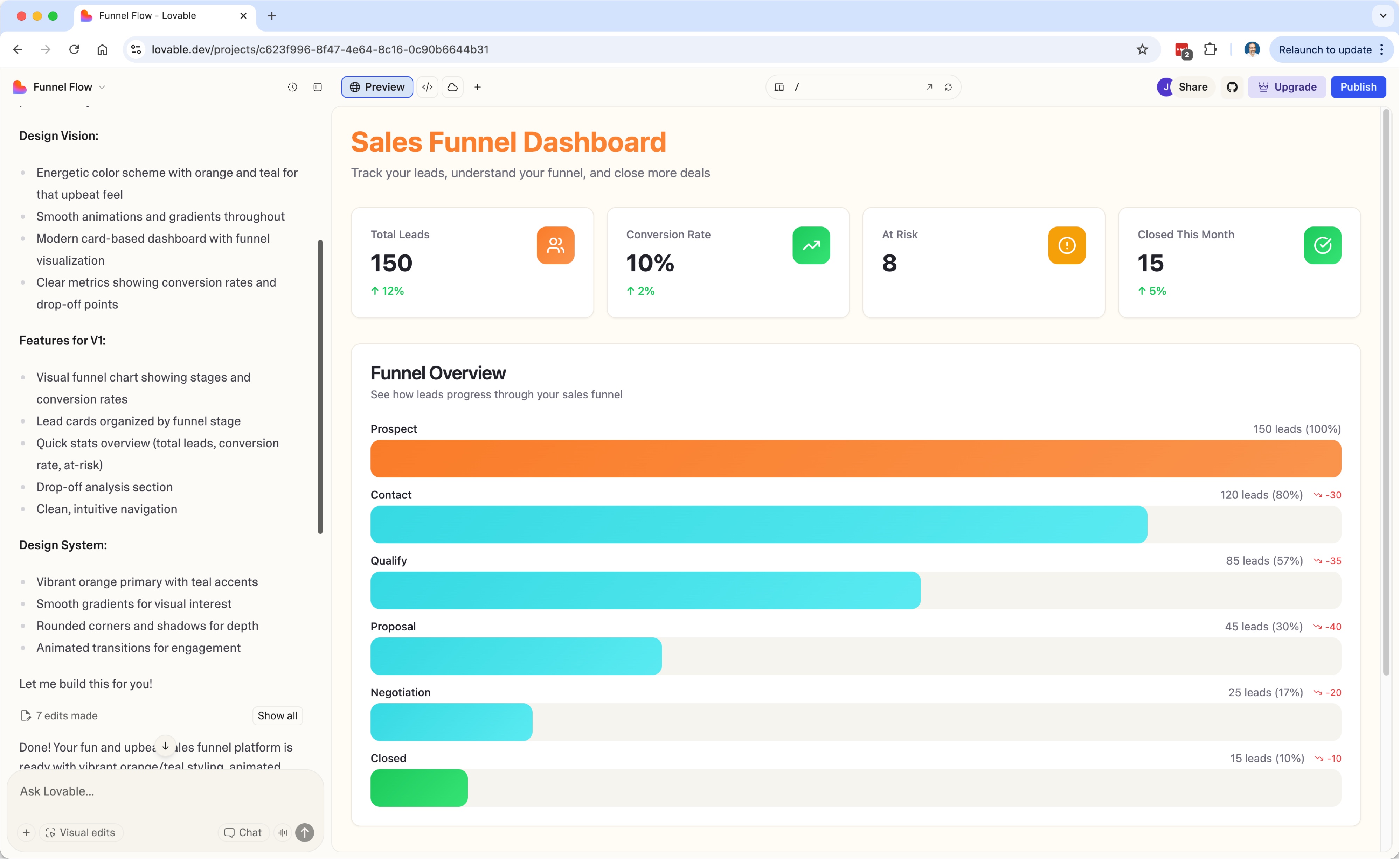
But it does. It can take a prompt and build an application right in front of your eyes without you needing to think about a ton of technical details to build something that works.
It does this by making several key decisions up front so you don’t have to to.
Lovable selects the technical architecture for your application and makes it very easy to make changes and immediately see and test those changes.
It’s incredible to be able to shape an idea and see it update right in front of you. It’s an incredibly fast feedback loop that allows you to iterate on your idea rapidly without the typical delay of working with a developer.
Not that developers aren’t worth your time. I might be biased, but I think we’re pretty awesome! 😁 But I’d also love for you to be able to work with developers like me when you need us for our technical expertise and experience, not because the code makes it too difficult for you to make even minor changes without us.
That system has been broken for quite a while. Lovable and similar AI tools are set to change that dynamic for the better.
How do the pieces fit together?
If you’re using Lovable, it’s making a lot of decisions for you on how your application will be hosted. It’s a very standard “serverless” setup, which means you don’t need to worry about any of it!
Most of this happens between two platforms. Lovable itself, and a service called Supabase.
Lovable hosts your application, and Supabase handles storing data, processing it, authentication and security.
I’m not going to go into too much detail here, as this is meant to be a mostly non-technical guide, but I will say that the choices Lovable makes for you are all pretty common industry standards that are easy to hire developers for and scale extremely well as you grow.
A key thing I’ll talk about in a bit more detail in the next section is that Lovable doesn’t make any decisions at this point that lock you into anything you can’t get out of later if you change your mind or outgrow it. That’s critical and it’s something that I’m afraid is going to become a bigger problem at the market matures.
What if I don’t want to use Lovable?
Lovable is absolutely not the only AI solution around. The best solution for you can depend a lot on the level of experience you’ve got. For some people with more technical experience, tools like Cursor, Codex or Claude Code can be the best tools for the job. For others who are less technical, Lovable, Replit, Bolt, Bubble (a warning on Bubble further down), Vercel’s v0 and so many more can be the better bet.
It’s really about finding a tool that works for you. At the moment, so much of AI code generation is very similar from one tool to the next. We’re in the Wild West era of AI tools and there’s also no guarantee that the right tool for today will be the right tool in two years.
Avoiding vendor lock-in
At the moment, the biggest suggestion I can make at this stage is to be more careful about tools that lock you in to them. That’s one reason I’m a big fan of Lovable. There’s no significant lock-in, in fact, quite often customers I’m working with are making minor or experimental changes in Lovable while I’m working directly with the code or using Cursor, all at the same time.
Bubble is a good example of a platform that has significant barriers to leaving if you decide it’s no longer the right tool or you’ve outgrown it. Because everything is hosted within Bubble and the export options are limited, if you decide to leave, it’s going to be a lot of work.
Lovable and Replit are great examples of platforms that give you full access to the source code and can be hosted anywhere you like.
As I mentioned in the previous section. I think this is going to become more of a problem going forward. Commercially it makes sense for these platforms to get you into the platform by being cheap and easy to use, then when you’re hooked and need them jack up the prices.
Early decisions in your startup, now, could end up being costly later on.
2. Becoming a builder
Prompting
The idea of building software through a prompt is massively appealing to a huge variety of people. So much of creating technical products has been locked behind source code, syntax, and programming languages. To the point that a lot of software developers honestly believe the source code is the most important part of the product.
But that’s never been the case. It’s always been a “necessary evil.” The code was required to build the product, to solve problems, to enable people to do new things.
Using AI helps us skip that and get straight to those critical things that are the reason we create software in the first place.
But, there are some important things to keep in mind when starting to prompt.
Let’s call this a non-technical guide to software development.
Software developers learn more than just code
For a junior developer, so much of their life is about code. They begin to believe that’s the focus of their learning, because they have to spend a significant amount of time and energy dedicated to it.
But at some stage, they start to learn much more important lessons, and these are the ones that don’t go away just because the code has.
Software developers spend their time becoming excellent at testing, troubleshooting, problem solving, managing projects, communicating, learning how users use their applications (or why they don’t). The AI can’t do a lot of these jobs, at least not as well as a human can. (Yet!)
These are all things, you’ll still have to learn at some stage. That said, AI can help with a lot of these things and it can be a fantastic teacher if you’re not certain what to do.
For example, you can ask ChatGPT for advice on how to manage your project. Share information about the sort of project, how many people are on the team, how much overhead you want for managing it and it can probably come up with a pretty good plan for you to follow.
This is a non-technical journey, but it’s still a journey of learning new things. So buckle up! Here we go!
Building with an AI isn’t about magic prompts
There are no “4 prompts to build any app” like I see posted too frequently on social media.
Building applications has always been about iteration and this hasn’t changed. Small changes incrementing toward something greater.
This is true in all software development. Small changes are safer and easier to understand the full implications of. Big changes are harder to fully plan, document and understand and are, therefore, inherently more risky.
The idea that you could write a few sentences and build a product that you can sell is somewhat absurd if you think about it.
The amount of effort and planning that goes into validating ideas, understanding the pains your customers are facing or the opportunities they’re looking for and designing a solution for those can’t be described in a few sentences. So how could an AI take a few sentences and build a solution?
AI is a pattern matching engine. It takes what you say and tries to find existing patterns to fit.
If your business idea is something AI can build after a few prompts, you’re probably building something that’s so cookie cutter that it’s just a clone of 50 other products that are doing exactly the same.
There are always special circumstances, where an existing tool can be applied to a new market or in a particular way so a clone can be a perfect fit, but under normal circumstances, go into this assuming you’re going to spend time iterating on your idea and expanding and improving upon it as you go.
Be descriptive!
You don’t have to tell the AI how to build the functionality, but the more descriptive you are about exactly how you want something to work, the more likely it is to turn out how you imagined it.
The more you leave the AI to be “creative” the less likely it’ll be what you imagined.
Sometimes there are happy accidents and it comes up with something better, but in general you’re going to have better odds if you leave little to the “imagination”.
Walk the AI through, step by step what you expect to happen. If there are multiple possibilities, outline them as best you can. You don’t need to write War and Peace, but the more descriptive you can be, the better the results will be.
This sort of consideration is an important part of software design in general. It’s well worth spending the time to really think through how exactly your application should work and understand all the permutations and possibilities.
If you don’t, whether you’re using AI or traditional software development, things are going to go wrong.
Quality is about testing.
I’ve seen a lot of people (mostly software developers) talk about AI slop. I’m not here to argue that AI is going to write the best code ever.
If we’re being honest, most real world products don’t have the best code ever either! Ensuring quality is all about testing.
I’ve seen some absolutely beautiful source code that didn’t do what the software was meant to do and I’ve seen code that looked like someone fell on the keyboard and hit compile that worked flawlessly for years.
The difference? Testing. One was tested thoroughly to ensure that it did exactly what it was supposed to do, consistently. The other wasn’t. It’s as simple as that.
This is an important opportunity for us, as builders, to transition from a focus on quality code, to quality results.
Unexpected Things
Another thing to keep in mind, is that things inevitably will go wrong and that’s ok!
No application has ever been built with no bugs and even if they were, as soon as end users start to use it, they’ll find new and creative ways to do things you never even considered them doing.
The key isn’t to try to avoid unexpected things, it’s to be prepared for them and know how best to dig into them and make corrections.
Playing detective 🕵
This is when you have to play detective and do some sleuthing. When things go wrong, SOMETIMES you can tell the AI what’s happening and it’ll find the problem. But all too often you’ll need to help it understand the problem.
That means you’re going to have to do some troubleshooting to see why things are failing.
The first step is to really understand the problem. What’s happening? Can you make it happen again? Can you thoroughly describe the circumstances that lead up to it happening? These are all important contextual hints that will help the AI know where to go to fix things.
Before jumping straight into fixing the problem, it’s very worth taking the time to fully understand the problem first. You don’t necessarily need to be technical to do this, but sometimes it does help!
Being able to check network requests in the Chrome Developer Tools, is a great way to level up your ability to understand what, exactly, is happening.
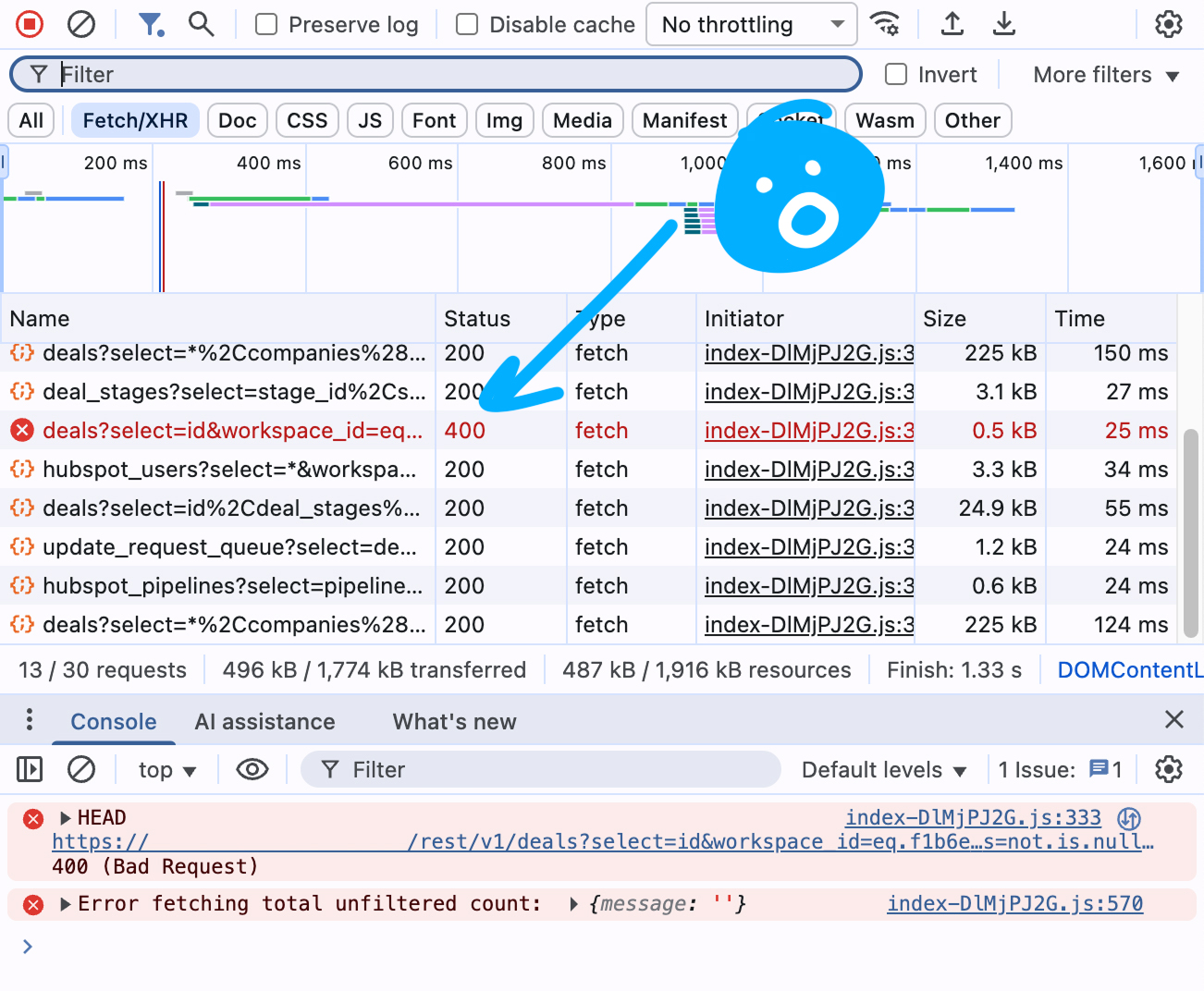
Without doing this, you can very easily end up stuck in a loop where the AI keeps trying similar things and getting nowhere or, worse yet, it can take a more extreme approach to solving the problem than you expected it to.
Uh Oh, the AI rewrote our security system!
The AI doesn’t always pick the most efficient change to implement a new feature or solve a problem. The more leeway you leave it, the more likely it is to do something unexpected.
I saw a great example with a client who found an issue with logging in. They told the AI they were having problems logging in. They gave it a basic description of what wasn’t working and the AI went off to fix it. So far, so good!
When I was able to take a look, I immediately realised that the server was down. So it wasn’t a code problem at all, but our authentication system wasn’t available. What we really needed was something to let people know that there were some temporary issues and they should try again later.
What the AI actually did to try to solve the problem was delete the entire authentication system and replace it with a brand new, very similar, one that didn’t work and didn’t account for quite a few of the things we’d built into the security system initially.
Shockingly enough, because the server was still down, it didn’t solve the problem. It also left me with a little bit of a mess to clean up. 😆
This is a fairly consistent problem with using AI to build software. Even in less major ways, it’s difficult to keep the AI focused on just fixing the problem or adding the feature you’ve asked for. This creates extra burden on the testing side.
That said, the extra testing burden is not as significant as the savings in time and effort in the development phase, so it’s still a win. But it’s worth always keeping in mind that every change risks breaking things that used to work.
Beyond the Prompt
At some stage, your software is going to grow to the point that the AI struggles. The current generation of AI code tools are severely limited by the amount of “context” they have available for a prompt.
This context can be thought of like the AI’s memory. It can only make decisions based on what fits in its memory, which includes your chat, any built in rules (for example, Lovable has a set of rules that the AI should follow that are always in this context), and the source code involved in the change.
So as the application grows you need to start helping to guide it more and more to make sure that it’s only looking at what’s relevant.
From black box to source code
In those early days of development, the AI can keep your entire application in the context, so it knows exactly where everything is without guidance. It can keep track of how a change can impact any part of the application.
As the application grows, it can start to feel like the AI is getting dumber. It starts to make changes that work in one part of the application, but not another. It starts to forget things that you’ve made clear to it. It feels like it’s getting a little out of control.
A lot of this is down to the fact that the AI can’t keep your entire application in its memory anymore and it needs you to start to transition from trusting it to understand your application structure to starting to learn how to tell it what things matter and what don’t.
Having a technical background makes this much simpler, as you can start to tell it which files matter, directly and share the correct information for it to understand what a change will impact.
Without that, though, you can build some really great habits that will help limit the scope of what the AI will work on. When you’re working on things, mention specific pages, give guidance on what parts of the application you feel the AI should consider when making changes.
This will help it better understand where it needs to check before making decisions, but it will also help limit the scope of what things it will change when it does make updates.
Performance
When does performance matter? It probably doesn't nearly as much as you think.
I’ve seen quite a few founders (and devs) worry too much and too soon about the performance of their applications. In most cases, performance is something that doesn’t matter until it matters and it’s usually not overnight.
Client-side filtering pitfalls
Content coming soon...
Rate limits and scaling awareness
Content coming soon...
Is it secure?!
- Row Level Security
- Supabase keys
- What's sent to the client (DevTools again)
Content coming soon...
Product Management
- What is a backlog?
- Prioritising effectively (founder intuition vs user feedback)
- Learning to say no to features you love
- Tools for managing your project
- Documenting decisions (helps with AI prompting later)
Content coming soon...
Deployments
Is your app ready?
- Readiness checklist
- Early users vs full release
Content coming soon...
Having multiple versions
- Environments
- Dev vs Test vs production
Content coming soon...
3. Beyond Prototyping and MVPs
Outgrowing Supabase
Content coming soon...
When it happens (and when it doesn't)
Content coming soon...
Monitoring
Content coming soon...
Why monitoring is important
Content coming soon...
Tools for monitoring your application
Content coming soon...
Hiring a Developer
Content coming soon...
When to hire (and when not to)
Content coming soon...
What to ask during interviews
Content coming soon...
Selecting the right person for you
Content coming soon...
Working with your new dev
Content coming soon...
Defining founder/dev roles
Content coming soon...
Setting expectations
Content coming soon...